What is HDMI?
HDMI explained
 HDMI stands for High Definition Multimedia Interface and is the most frequently used HD signal for transferring both high definition audio and video over a single cable.
It is used both in the commercial AV sector and is the most used cable in homes connecting devices such as digital TV, DVD player, BluRay player, Xbox, Playstation and AppleTV with the television.
More and more home AV devices are being connected using this simple, effective cable, but now HDMI is also featuring on laptops and PCs and therefore becoming the standard for the corporate and commercial markets – for education, presentation, digital signage and retail display to transmit high quality audio video siganls from device to device.
Fitting a HDMI cable into the AV system
HDMI is a digital interface, single cable solution for combined HD video and audio, replacing analogue solutions which require separate audio/video cables (such as VGA and audio jack).
Use a HDMI lead to connect the output from your HD source (the Blu-ray player or the Skybox, for example) to the input of our HD displays – whether that be your TV, commercial screen or projector, all the way up to a multi-screen video wall! HDMI cables will also be used in an AV / home entertainment system if the system includes additional control or signal distriobution devices such as a signal splitter, HDMI switcher or AV matrix.
What are the differences between HDMI cables and connectors?
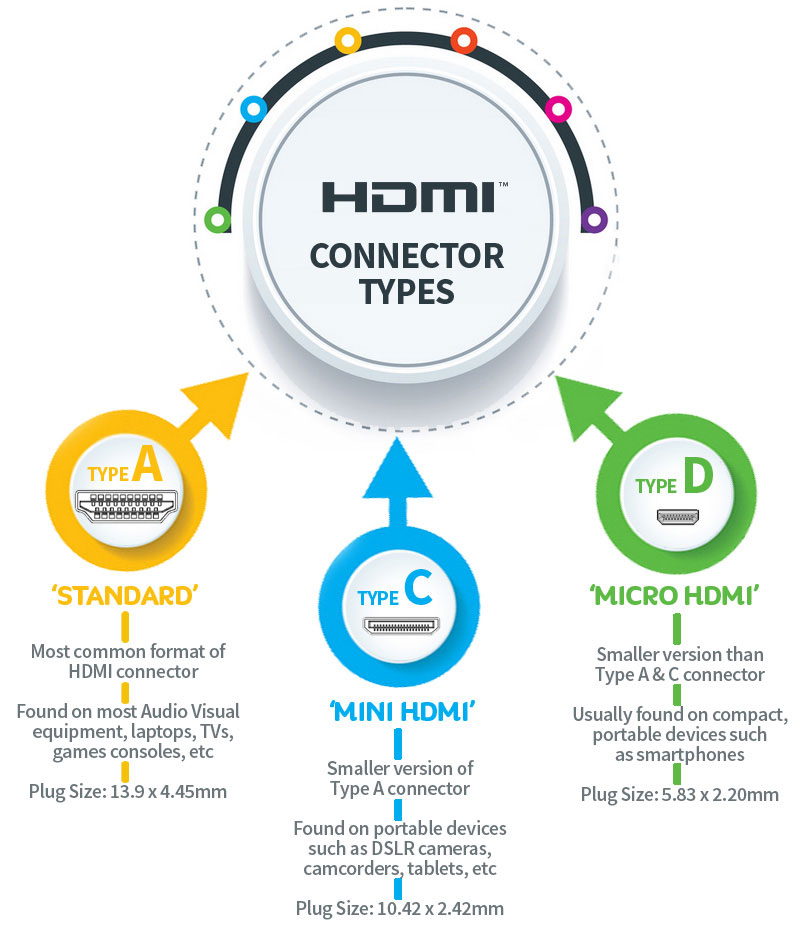
The Standard 14mm version of HDMI connector is known as ‘Type A’ and is available as either a ‘plug’ or ‘male’ connector on the cable. A normal HDMI cable will usually feature a plug at both ends, with HDMI Type A Sockets featuring on the AV devices (the Source, Display, Screen, TVG, etc).
The HDMI Type A connector is the most common version and can be found on the majority of audio visual equipment and devices, from your TV, Blu-Ray and XBox to professional distribution equipment such as HDMI distribution amplifiers, matrix devices and siganl switchers.
But there are also HDMI Mini (Type C) and HDMI Micro (Type D) HDMI connector versions available, as smaller and smaller devices, such as our smart phones and tablets increasingly become our personal HD AV sources.
However, there are limitations to the distance HDMI transmissions can travel. At CIE we recommend when using Category 1 ‘standard’ HDMI cable that the lengths are limited to probably no more than 10 meters.
There is high grade Category 2 cable available, using which we can successfully achieve cable lengths of up to 15 metres.
There are a number of options to increase the distance of your HDMI signal:
– Using HDMI switchers and repeaters; which will effectively ‘amplify’ or recalculate your HDMI signal, allowing the transmission to be improved and extended.
– Using the latest HDMI-over-Ethernet cable or HDBaseT technology;
– Using HDBaseT technology you can extend your signal to up to an incredible 100 metres over standard cat 5e, 6 or 7 ethernet cable.
These systems require specific transmitter/receiver devices, all of which we look into in great detail in other videos on the HowToAV video channel.