How to embed audio onto a HDMI signal
 Why may embedding audio onto an HDMI signal be required?
A HDMI features both HD video and HD audio over the same signal. However, there are certain situations where a different audio signal overlaying a video signal may be required. An AV system may feature the video signal from a HDMI source combined with the audio signal from a different source. Instead of having to use both a separate screen and audio system to output these two independent sources a digital or analogue audio signal can be inserted or embedded into a HDMI signal, this allows the combined video and audio signal to be outputted on the same display device.This may seem like it is rarely necessary however there are some examples of where this may be required including:
- A high street bank may display BBC news with subtitles on a video channel but combine this with audio advertising or music masking on an audio channel.
- A sports bar or a betting outlet where the screens might be displaying sky sports as the picture but the sound might be radio (e.g. 5 live) or could be broadcasting two different events at once.
How to embed audio onto an HDMI signal
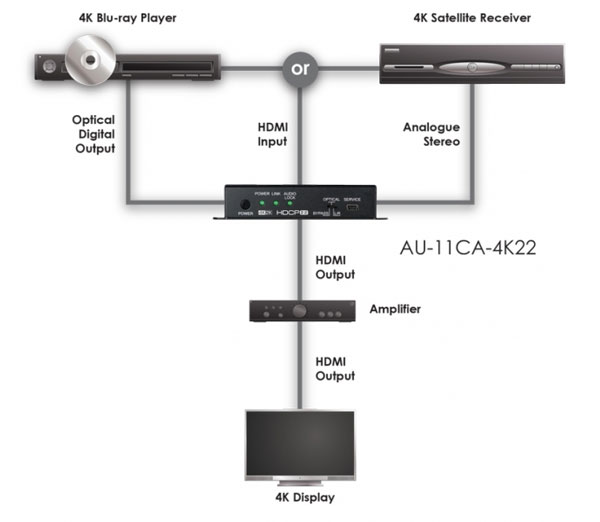
To embed or insert audio signal an audio inserter or audio embedder can be used. An audio to HDMI inserter device features a HDMI input and various audio inputs. For example, an audio embedder device may have an optical input and two RCA sockets for an analogue audio signal. The device then embeds the required audio signal over the incoming HDMI signal and then sends this out as a combined signal via the devices HDMI output. This can then be connected to the display device, a simple television or a larger AV system.
What is an Audio de-embedder?
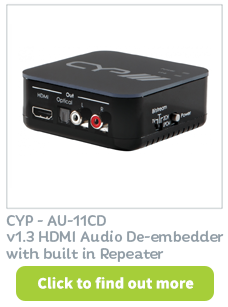
It is important not to confuse an audio embedder with an audio de-embedder. The de-embedder as expected does exactly the opposite by stripping out the audio from the HDMI source for connection to a separate audio system. This can be done to output the audio from the HDMI source to a separate sound system for example a sound reinforcement system or a PA system in a commercial application. Examples in the home include using a Hi-Fi system to improve the sound performance of the latest expensive television. The image may look great but the television is likely to have internal loudspeakers. Internal loudspeakers do not produce a quality of sound anywhere near as good as the picture on the screen; therefore using the Hi-Fi system will enable high quality sound as well as high quality picture display.
Audio embedded onto a HDMI Signal System Diagram